
|
Getting your Trinity Audio player ready...
|
Exploring EasyEDA: The Ultimate Browser-Based CAD Software for Electronics Designers
Welcome to PCBElectronics! Today, we’ll delve into EasyEDA, an innovative browser-based CAD software that has made significant waves in the electronics design community. Whether you’re a hobbyist tinkering with a DIY project or a professional seeking efficient design tools, EasyEDA offers an intuitive platform for all your electronic design needs.
What is EasyEDA?
EasyEDA is an online Electronic Design Automation (EDA) tool that provides users with a convenient way to design circuit schematics, print circuit boards (PCBs), and even simulate their designs. Being browser-based means that you can access EasyEDA from anywhere without the need for any software installation. This has made it particularly appealing in our fast-paced, mobile world where flexibility is key.
Key Features of EasyEDA
1. User-Friendly Interface
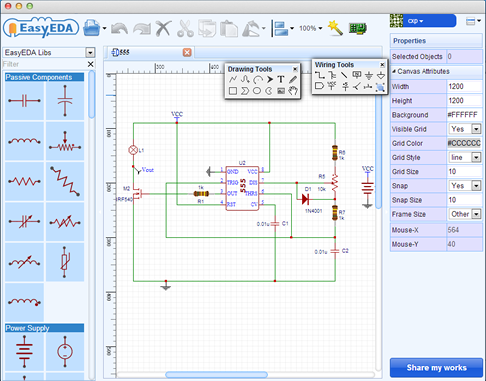
One of EasyEDA’s standout features is its user-friendly interface. When you first log in, you’ll be greeted with a clean, organised dashboard that allows you to easily navigate through your projects. The drag-and-drop functionality means you can quickly add components to your schematics. This is ideal for beginners who may feel overwhelmed by more complex software options.
2. Extensive Component Library
EasyEDA boasts an extensive library of over 1 million components. This comprehensive collection includes everything from basic resistors and capacitors to complex integrated circuits. The library is regularly updated, ensuring that designers have access to the most current components available in the market.
3. Schematic Capture and PCB Design
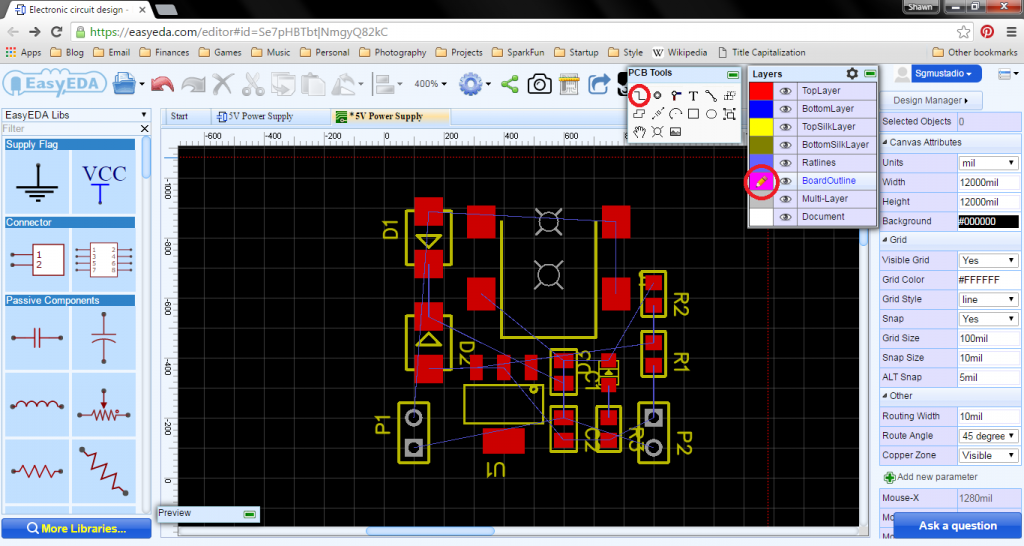
With EasyEDA, creating schematics and designing PCBs is a breeze. The software allows you to easily translate your schematic into a PCB layout with a few clicks. Once your PCB design is complete, EasyEDA provides automatic routing options to help you optimise the layout, minimising space and improving performance.
4. Simulation and Testing
Before finalising your design, you can use EasyEDA’s simulation tools to test how your circuit will behave under different conditions. This feature is crucial in helping to catch errors early in the process, saving time and resources down the line. You can simulate everything from simple resistor networks to complex digital logic systems, giving you confidence in your design’s functionality.
5. Collaboration and Sharing
Collaboration is made easy with EasyEDA. Users can share their projects with peers or clients via links, allowing others to view or even contribute to the design. The platform supports real-time collaboration, making it a fantastic tool for team-based projects.
6. Manufacturing Services
Once your design is complete, EasyEDA can take you through the manufacturing process. They offer services to get your PCBs produced and delivered directly to your door, streamlining the entire design-to-production workflow.
7. Learning Resources
Navigating a new CAD tool can be daunting, but EasyEDA has built-in tutorials and a rich library of resources to guide users through the essentials. Their online community is also very active, offering a plethora of examples and project inspiration to help users get started.
Conclusion:
In summary, EasyEDA stands out as a powerful, accessible tool for anyone involved in electronic design. Its browser-based platform, extensive library, and robust features make it suitable for both beginners and seasoned professionals. Whether you’re looking to prototype a new idea or develop a complex product, EasyEDA is certainly worth considering. Interested in trying it out? Visit EasyEDA’s official site and start your electronics design journey today! For more tips, tutorials, and insights into the world of electronics, make sure to subscribe to our blog at PCBElectronics.co.uk! Feel free to share your thoughts or experiences with EasyEDA in the comments below!
